コーディングのお仕事で実装することがあったので自分用メモです。
こちらにあったものをデザインデータに合わせて変更しました。
コピペでできる!CSSとhtmlのみで作る「続きを読む」の開閉ボタン - コピペっと copypet.jp|パーツで探す、web制作に使えるコピペサイト。
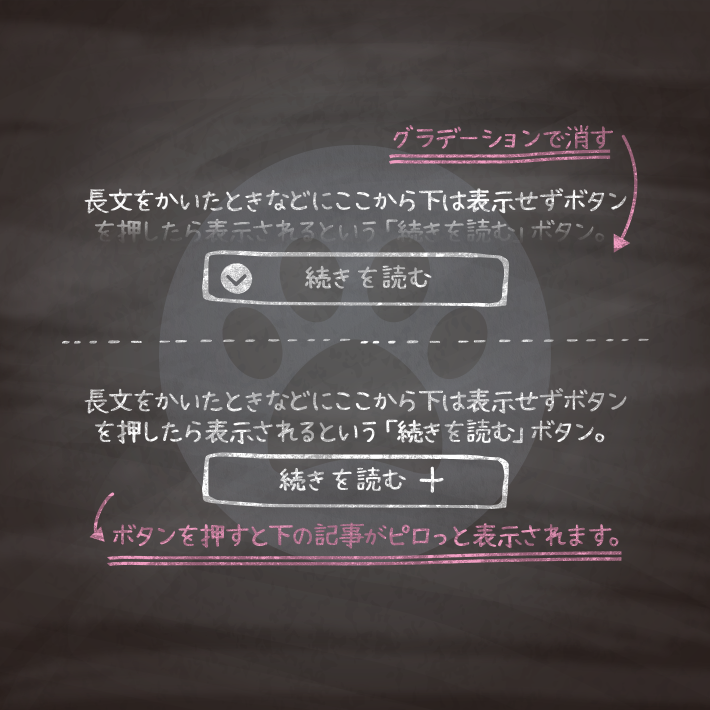
長い文章などの高さを制限して、クリックで表示したいときによく使われている「続きを読む」 「もっと見る」ボタンのサンプルです。 要素を隠して、ボタンをクリックすると全文が表示されるアレです。 UIが適切かはともかく、ページの高さを節約したいと...
copypet.jp
ソースコード
HTML
<div class="ReadMoreBox">
  <input id="cp01" type="checkbox">
  <label for="cp01"></label>
    <div class="ReadMore_container">
      <p>親譲りの無鉄砲で小供の時から損ばかりしている学校に居る時分学校の二階から飛び降りて一週間ほど腰を抜かした事がある。</p>
      <p>なぜそんな無闇をしたと聞く人があるかも知れぬ。別段深い理由でもない。新築の二階から首を出していたら、同級生の一人が冗談に、いくら威張っても、そこから飛び降りる事は出来まい。</p>
      <p>弱虫やーい。と囃したからである。小使に負ぶさって帰って来た時、おやじが大きな眼をして二階ぐらいから飛び降りて腰を抜かす奴があるかと云ったから、この次は抜かさずに飛んで見せますと答えた。</p>
    </div>
</div>
CSS
.ReadMoreBox *, .ReadMoreBox *:before, .ReadMoreBox *:after {
  -webkit-box-sizing: border-box;
  box-sizing: border-box;
}
/*続きを読む*/
.ReadMoreBox {
  position: relative;
}
.ReadMoreBox label {
  position: absolute;
  z-index: 1;
  bottom: 0;
  width: 100%;
  height: 140px; /* グラデーションの高さ */
  cursor: pointer;
  text-align: center;
  /* 以下グラデーションは背景を自身のサイトに合わせて設定してください */
  background: linear-gradient(to bottom, rgba(250, 252, 252, 0) 0%, rgba(250, 252, 252, 0.95) 90%);
}
.ReadMoreBox input:checked + label {
  background: inherit; /* 開いた時にグラデーションを消す */
}
.ReadMoreBox label:after {
  line-height: 2.5rem;
  position: absolute;
  z-index: 2;
  bottom: -85px;
  left: 50%;
  width: 308px;
  height: 68px;
  background: url("画像のパス") center top no-repeat;
  content: "";
  transform: translate(-50%, 0);
}
.ReadMoreBox input {
  display: none;
}
.ReadMoreBox .ReadMore_container {
  overflow: hidden;
  height: 125px; /* 開く前に見えている部分の高さ */
  transition: all 0.5s;
}
.ReadMoreBox input:checked + label {
  /* display: none ; 閉じるボタンを消す場合解放 */
}
.ReadMoreBox input:checked + label:after {
  content: "";
  background: url("画像のパス") center top no-repeat;
  bottom: 0;
}
.ReadMoreBox input:checked ~ .ReadMore_container {
  height: auto;
  padding-bottom: 100px; /* 閉じるボタンのbottomからの位置 */
  transition: all 0.5s;
}
JSを使用せずに実装できるなんて、素晴らしいですよね。
作ってくださった方には感謝です。
コメント